Connecting two devices
There is no server bringing devices together. A person does that: they carry a short, signed invitation from one device to the other. After that the devices talk directly to each other.
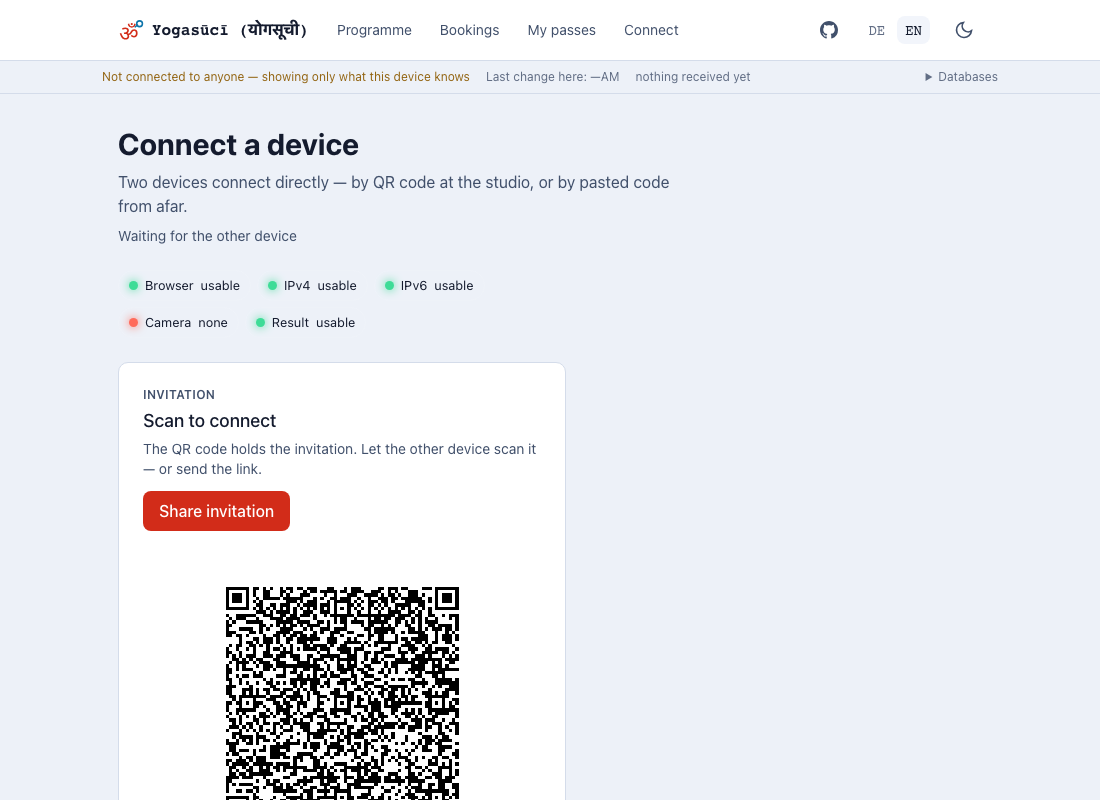
The invitation is already there when you open the screen. You do not create it — at a counter, with somebody standing in front of you, every step costs something.
Two ways, one invitation
The QR code — the way inside the studio. The other device scans it, and that is all there is to it.
The link — when you are not in the same place. Share invitation opens the usual share sheet; the other side taps the link and their device answers by itself.
This is not one or the other: the QR code contains that same link. It is one invitation in two forms, not a choice between two procedures.
The reply has to come back
A connection takes two steps, and this is the one people forget. Whoever opens an invitation produces a reply — their screen then shows it exactly the way yours showed the invitation. That reply has to come back: let it be scanned, or send it. Only then is the connection up.
The screen tells you where you stand while this happens. After a successful scan it says "Code read and verified" — you do not have to guess whether the camera caught it. And the code shown afterwards is labelled Reply rather than Invitation: same place, different meaning.
Once the connection is up, the code disappears. That is deliberate — it has been used, and an image that stays up looks as though nothing happened. If another device is joining right away, Connect another device puts a fresh invitation on screen.
If the reply comes back through a messenger and you tap it, the browser usually opens a new tab. That is fine. It passes the reply to the tab where the invitation was made and tells you it can be closed. The connection happens where you started.
An invitation is valid for ten minutes
After that it has expired, and the other side is told so. That is deliberate rather than a fault: somebody who photographs a code, or digs an old link out of a chat, should not be able to do anything with it.
For the QR code at the counter this does not matter — the screen renews the invitation by itself as long as it is open. For a link you sent, it does: if it is opened after lunch, simply make a new one.
Think before sharing through a messenger
An invitation contains your device's network addresses. Sent through WhatsApp or
email, those reach the operator and every chat the link is forwarded through. The
sensitive part sits after the # and is therefore never sent to a web server —
but the messenger sees the string you hand it. Inside the studio the QR code is
the better way: it does not leave the room.
Advanced: copy and paste
The text route lives under Advanced. It is for a device with no camera and no share sheet — an older tablet at the counter, say. Copy the text, paste it on the other device, carry the reply back.
It is deliberately not on show: two visible routes side by side lead to the question of which of the two strings is the right one, and nobody should have to ask it.
Advanced: short code
Noticed that the QR code does not stand still but cycles through several images? That is deliberate: the invitation is longer than fits in a single code, so it is split into a sequence. Scanning it works fine — but the phone has to be held steady for a moment.
Under Advanced there is a switch for that: Short code. The same thing is sent, packed more tightly: about a quarter of the characters, and out of that comes one still image. At a counter that is a glance rather than a small choreography.
It is off until somebody turns it on, and the reason is not that it is unfinished. Measurements of the underlying package found that under load about every second connection built this way went silent — connected, no error message, but nothing arriving. For a cash book that is the worst failure there is: two devices look paired while the passes sold on one never reach the other. We have not seen it in our own runs; the switch stays off until we can say more than "not so far".
Reading a short code always works. The switch only changes what this device hands out. A device with it off scans the short code of a device that has it on without any trouble, and replies in the same format.
If a connection does stay silent: switch it off, Refresh the invitation, connect again. Nothing is lost.
Why connecting from afar sometimes fails
In the studio this never comes up: two devices on the same wifi always find each other. From afar it can fail, and the reason is not the app but the way the internet is built for domestic connections.
Almost nobody is directly reachable. Your phone has no address anyone outside can call. In between sits a NAT — a device in the router or at the provider that bundles many connections behind one shared address. For two devices to reach each other anyway, the exchanged code carries an arrangement about who knocks where. That usually works.
Some networks do not allow it. Mobile networks often use a NAT that opens a different door for every connection — which makes the arrangement worthless, because the address has already changed by the time the other side knocks. If both sides sit in such a network, no code in the world helps.
Hotel, guest and corporate wifi are the second case. They often block everything except browsing, and additionally isolate guests from each other so that nobody can see anyone else's devices. That is exactly what this app needs.
And the browser has an opinion too. Whether your device believes it is reachable depends partly on which browser you use. The same phone on the same wifi can reach different conclusions in two browsers. That is why the warning beside the share button is a statement about this browser, not about your network.
What you can do
In order, easiest first:
- Scan in the same room. The QR code needs no internet, only the shared network. This is the path the app is built for.
- Switch to wifi if one side is on mobile data. It is often enough for one of the two to be reachable.
- Switch the relay on. On the connection screen, directly under the network panel. A server then introduces the two devices when nothing direct works.
What the relay is, and what it costs
A relay is an intermediary. It does not replace the QR code — you still need that to connect for the first time. What it replaces is the direct path: when two devices cannot reach each other, the connection runs through the relay until the two find a direct route.
The price fits in one sentence: the relay learns that two devices want each other, and their IP addresses. It does not learn what they exchange — that stays encrypted between the devices. This is why it is off until somebody turns it on, and why a device without that choice calls nobody.
The choice takes effect the next time the app starts.
What we are working on
The honest state: for "both sides behind mobile NAT" there is currently no solution that needs no outside help. The relay is the answer we have — it works, but it is an intermediary you have to switch on and give something away to. We are still looking for something better. Until then: scan in the studio, use the relay from afar.
What an enabled relay discloses is set out in full in the privacy section.
When it does not work
The QR code will not scan. Turn up the screen brightness, 20–30 cm away, give the autofocus a moment. Otherwise: share the link, or the text route under Advanced.
There is a warning next to the share button. Your device has found that from this network it reaches nobody outside it — typical on mobile data. The QR code is still good: in the same room you still connect, because that needs no route out. It is a sent link that usually will not arrive. Switch to Wi-Fi, or have the code scanned in person.
The warning is a statement about this browser, not about your network. The same phone on the same Wi-Fi judges differently in two browsers.
"This reply belongs to an invitation this tab did not make." You opened a reply link, but the tab holding the invitation is gone — after a restart, for instance. Start again: new invitation, share it again.
It will not connect over a distance. Some internet connections do not let two devices reach each other directly. Inside the studio, on the same Wi-Fi, this is not an issue; across distance it can fail. The app says so rather than spinning forever. More under What the app cannot do.
Ending a connection
The connection screen has Hang up.
Use it at the counter. An open connection keeps syncing even when the student left long ago. Nothing is lost — you pair again next time.